


Weather Trip
4.251.00 Reviews
App Specs
- Version
- 1.2.5
- Updated On
- License
- Free
- Downloads
- 1,000,000+
- Developer
- PJW FAMILY PROPERTY LLP
- Categories
- Weather
- Platform
- Android
Screenshots


 Analysis by AppCompare
Checking the weather is easy; turning it into a sensible plan is the part that often takes time. I may look at a forecast, then check a separate travel app, then reconsider what to pack or whether an outdoor plan still makes sense. Weather Trip aims to bring weather and travel thinking together, so the forecast can help shape what I do next rather than remain a screen of conditions.
That practical focus is what makes this weather app worth a closer look. It is free, developed by PJW FAMILY PROPERTY LLP, and has an average rating of 4.5 from around 2.2 thousand ratings. It has passed a million installs, is rated for everyone, and its current version is 1.2.4. Those figures suggest a broad audience, but the more useful question is whether its planning angle genuinely saves effort in everyday use.
Where it can save a little time
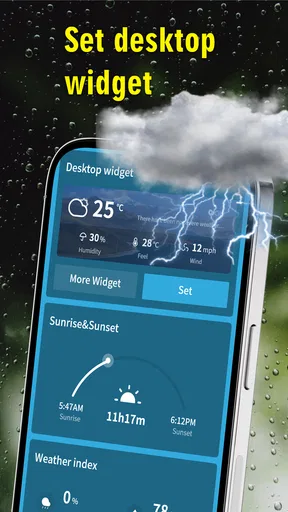
A forecast is most useful when it changes a decision. If I am choosing between a walk, an indoor outing, or a longer drive, I want the weather information to connect with that choice. Weather Trip is built around that kind of practical link, presenting real-time weather and extreme-weather information alongside a travel-oriented approach.
That can be helpful even when I am not going far. A local forecast can influence whether I leave earlier, bring an extra layer, or keep a backup plan ready. For travel, the same habit matters more: weather at the destination can affect what I pack and which activities deserve a place in the itinerary. The benefit is not that an app removes uncertainty; it is that a relevant forecast can make the next decision quicker.
Getting started with a useful routine
The first setup is most useful when I treat location as a planning choice, not just a permission prompt. I would begin with the place I need to make a decision about: home for the daily commute, or the destination for an upcoming trip. Before relying on any forecast, I would check that the location shown is the one I intended, especially if I am planning from home for somewhere else.
A simple routine helps avoid opening a weather app repeatedly without a purpose. I check the forecast when I am making a plan, then revisit it closer to departure if the weather could change what I carry or where I go. That is a sensible way to use a real-time weather tool without treating an early forecast as a guarantee. For an important trip, I would still keep a backup source available for conditions that could affect safety or transport.
Everyday plans and travel decisions
Picture a weekend visit planned around a long outdoor walk. Rather than deciding what to pack based on the season alone, I would check conditions for the destination and use them to decide whether to bring waterproof layers or keep an indoor alternative in mind. If the weather looks unsettled, that does not automatically mean cancelling; it means making the plan flexible before setting out.
Worth Reading Before You Choose

EA SPORTS FC Mobile 26 Is a Bigger Football Game, but It Takes Time

Flipboard Shows What News Apps Must Do Beyond the Feed

Switching to Android Auto Means Rethinking Your Driving Routine

Google Calendar Makes a Crowded Week Easier to Manage

Ludo King Makes the Most of the Minutes Between Plans

Baby Panda World Brings Quick Play to Modern Phones, but Its Game Library Feels Busy
For a commute, the useful question is narrower: will the weather change how I travel or what I need to carry? For a holiday, it becomes a sequence of small choices—what to do first, what to reserve for a clear spell, and which essentials should stay in the bag. Weather Trip’s travel-minded framing suits people who make those decisions regularly, while a person who only wants a quick temperature check may prefer a simpler forecast screen.
What the travel angle does—and does not—replace
Compared with a basic weather app, a travel-focused tool has a more useful job when I am considering a destination or timing an outdoor activity. Compared with a dedicated trip planner, though, weather is only one part of the puzzle. I would not use it as a replacement for checking transport schedules, opening hours, route details, or local guidance. Its value is strongest when weather is the missing piece in a plan, not when I need one app to organise every part of a journey.
That distinction also helps set expectations around reliability. Weather can shift, and a forecast is guidance rather than a promise. I would check current conditions again before a long drive, a flight connection, or an activity where a change in weather matters. For severe conditions, I would look for authoritative local alerts as well; an ordinary weather app should not be the only source for a safety-critical decision.
Weather Trip is available for Android devices running version 6.0 or later. Since it is free and rated for everyone, it is an approachable option to try for household planning or a casual trip. I would still judge it by whether its forecast and travel context fit my routine: an app earns a place on my phone when it helps me act, not merely when it offers another place to look.
First Impressions
The first thing that grabs your attention when you fire up Weather Trip is its sleek and intuitive design. The interface is modern, with vibrant colors that make navigation a breeze. You don’t need to be a tech whiz to find your way around, which is a relief.
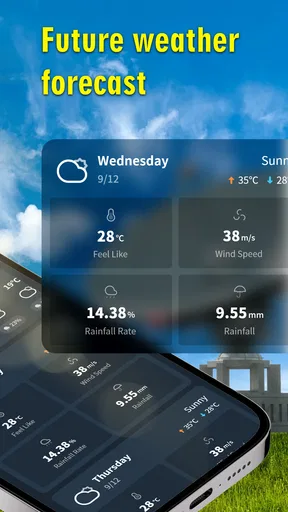
Upon entering your location, you’re greeted with a comprehensive weather forecast. But here’s where things start to get interesting: the app doesn’t stop at just telling you today’s weather or the week’s forecast. It goes a step further by integrating travel insights based on weather conditions. How cool is that?
Features That Stand Out
One of the standout features of Weather Trip is its ability to suggest activities based on the current and upcoming weather. Imagine you’re planning a weekend getaway. The app will let you know not just if it’s sunny or rainy, but it’ll also recommend activities that suit the weather, like hiking on a sunny day or visiting a museum when it’s pouring outside.
Another highlight is the travel advisory section. It keeps you updated on weather-related travel advisories, which can be a lifesaver if you’re planning a road trip or flying to another city. It’s like having a personal travel consultant right in your pocket.
Planning Your Trip
Planning a trip can be daunting, especially when you’re unsure about the weather conditions. This app simplifies it by providing detailed weather forecasts for your chosen destinations, along with practical tips to make the most out of your trip. Are you wondering when the best time to visit a particular place is? Weather Trip has got your back with seasonal insights that help you decide the optimal time for your travels.
The app also includes a packing checklist that adjusts according to the weather forecast. So, you’ll know if you need to pack that extra sweater or if you can leave the raincoat at home. It’s these little things that make a big difference in travel planning.
Usability and Performance
From my experience, the app runs smoothly with minimal glitches. The updates are quick, and the weather data seems accurate, which is crucial for any weather app. There’s nothing worse than planning your day around a wrong forecast, right?
What’s even better is that the app isn’t a battery hog. You can run it in the background without worrying about draining your phone’s battery life, which is a major plus for frequent travelers.
Should You Download It?
If you’re someone who loves to travel or just wants to make the most out of your local weather, Weather Trip is definitely worth downloading. It combines the functionality of a weather app with the practicality of a travel planner, making it a versatile tool for day-to-day use.
Overall, Weather Trip offers more than just weather forecasts. It provides a holistic approach to travel planning, making it an indispensable app for anyone looking to optimize their trips based on weather conditions. Give it a whirl, and you might just find yourself planning your next adventure with a little more confidence and a lot less stress.
Pros
- User-friendly interface with intuitive navigation.
- Accurate real-time weather updates.
- Customizable alerts for severe weather conditions.
- Detailed forecasts up to 10 days ahead.
- Supports multiple locations for easy tracking.
Cons
- Occasional ads can be distracting.
- Requires internet connection for updates.
- Battery consumption is slightly high.
- Limited offline functionality.
- Some features locked behind premium version.
FAQs for Weather Trip
What features does Weather Trip offer for travelers?
Weather Trip provides real-time weather updates, seven-day forecasts, and weather alerts for multiple locations. It also includes travel-specific features such as packing suggestions based on weather conditions and interactive maps for planning your journey. Additionally, users can set personalized notifications for weather changes in their selected destinations.
Is Weather Trip available offline?
Yes, Weather Trip offers offline access to your saved locations and previously downloaded weather data. This is particularly useful for travelers who may not always have internet connectivity. However, to update information and access new data, an internet connection will be necessary.
How accurate is the weather data provided by Weather Trip?
Weather Trip sources its data from reputable meteorological services, ensuring a high level of accuracy. The app uses advanced algorithms to provide timely updates and precise forecasts. Users can rely on its alerts for impending weather changes, though it's always good to verify with multiple sources in critical situations.
Does Weather Trip support multiple languages?
Yes, Weather Trip supports multiple languages to cater to a global user base. You can change the language settings within the app to suit your preference, making it accessible for non-English speakers and enhancing the user experience for international travelers.
What are the device compatibility requirements for Weather Trip?
Weather Trip is compatible with both Android and iOS devices. It requires Android 6.0 or later and iOS 11.0 or later. The app is optimized for both smartphones and tablets, ensuring a seamless experience across different devices. Make sure your device meets these requirements before downloading.


